
You may be Wondering To put these in your blog posts also. But putting emotions one by one is very difficult and boring by entering the image code.Now you can Put emotions to your blog posts easily by following some simple steps that follows below. But before continue check whether you are using Mozilla firefox browser or not . You cannot continue any steps without using Mozilla Firefox as your internet browser.
Step 1
Install
Greas monkey in your Browser which is also a type of Firefox add on To get this click here! .After you install restart Mozilla Firefox to make the add on work .You can Restore session later.
Step 2
Click
this Script and then Click Install.
Step 3
Goto your blog code Section and search the code ]]>
Step 4
Paste the following code Just above the above Code from step no 3.
img.emoticon {
padding: 0;
margin: 0;
border: 0;
}
Step 5
Save your template.
To find whether you are done or not. Goto Blogger Create post ,you will see the emotions in the Tools panel of the Compose tab as in the image below./
bloganol.com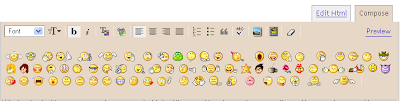
Enjoy!


